Budget PCIe 4.0 done right.
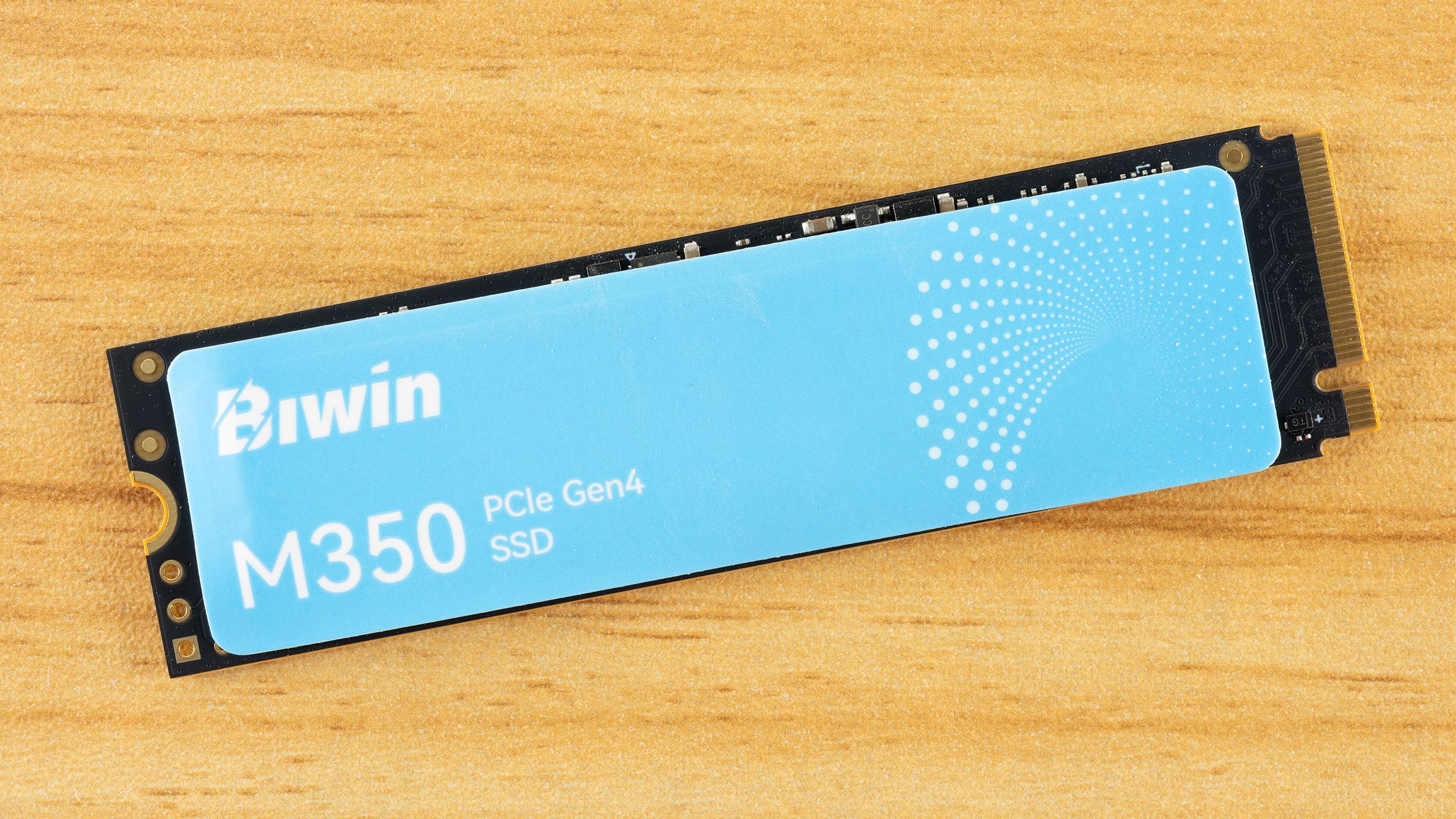
This is the headline Biwin wants you to read about its M350 SSD, and for the most part, it’s not entirely misplaced. In a market perpetually flooded with entry-level PCIe 4.0 drives, distinguishing oneself without resorting to the same tired compromises is a Herculean task. Biwin’s M350, a 2TB model we’ve been examining, attempts just that by focusing on power efficiency and solid random performance, making it a surprisingly compelling option for laptops and secondary storage. It even squares off against established players like the Kingston NV3, and frankly, it’s punching above its perceived weight.
Hardware Under the Hood
At its core, the Biwin M350 employs Silicon Motion’s SM2268XT2 controller. This is a capable four-channel, DRAM-less design, a common choice in this segment, capable in theory of much higher sequential and random IOPS than Biwin has advertised. The drive also utilizes Micron’s 232-layer QLC flash (N58R). While QLC is inherently less performant and durable than TLC, especially under sustained writes, its cost-effectiveness makes it a staple for budget drives. The key here is how Biwin has chosen to spec and tune this hardware – deliberately modest, much like its competitor, the Kingston NV3. This allows for flexibility, potentially extending endurance or simply avoiding the need for aggressive thermal throttling. It’s a calculated approach to hitting a specific price-performance bracket, not a fundamental flaw in the silicon itself.
Performance Metrics: Where It Shines and Falters
The M350’s strengths lie in its random read performance, often the most critical metric for everyday computing tasks like operating system boot times and application loading. Biwin claims up to 400K IOPS for random reads on the 2TB model, which is respectable for a QLC drive. Power efficiency is another highlight; rated at 3.3V/2.0A (6.6 watts), the actual power draw is considerably less, making it ideal for battery-conscious mobile devices. However, the drive’s achilles’ heel, as expected with QLC, is its sustained write performance. The sequential write speeds, while decent initially, will plummet once the drive’s SLC cache is exhausted. This means large file transfers or heavy write workloads can become a significant bottleneck, a common trade-off in the budget SSD space.
Biwin’s M350’s competitive hardware makes for a compelling QLC-based budget SSD without making heavy compromises.
This quote from Tom’s Hardware, the original reviewer, sums up the core thesis: it’s a balanced approach. The drive doesn’t aim for the theoretical maximums its controller could achieve, opting instead for a configuration that prioritizes everyday responsiveness and efficiency over peak, often unachievable, sequential write numbers. For the average user, this is likely a more beneficial configuration. This mirrors a strategy we’ve seen emerge in other budget segments – deliver what most people actually need, not just the headline specs that impress on paper.
Software and Support: A Minimalist Approach
Biwin provides two software utilities: Biwin Intelligence and the Biwin Data Recovery Tool. Intelligence offers standard SSD management features like firmware updates and diagnostics. The Data Recovery Tool, while present, should be viewed with a healthy dose of skepticism for any SSD, especially QLC. Data recovery from SSDs is notoriously difficult once blocks are TRIMmed and reallocated. It’s a useful reminder that while software support is appreciated, reliable backups remain the non-negotiable foundation of data security. The drive comes with a five-year warranty and 800TBW endurance for the 2TB model, which is standard for QLC and more than sufficient for most typical users.
Is the Biwin M350 a True Budget King?
The Biwin M350 2TB SSD presents a pragmatic solution for users seeking PCIe 4.0 speeds without breaking the bank. Its strong random read performance and excellent power efficiency make it a standout for laptops and secondary storage. However, potential buyers must temper expectations regarding sustained write performance. It’s not a drive you’d choose for a primary workstation handling massive video edits or constant large file writes. But as a component that offers a significant upgrade over SATA SSDs and older PCIe 3.0 drives, all while sipping power, it’s a strong contender. Biwin has successfully navigated the treacherous waters of budget SSD manufacturing by understanding its target audience’s needs: speed for common tasks, efficiency for mobile use, and a price that makes sense. It’s not the fastest drive on the block, but it’s a very smart one for its intended purpose.
🧬 Related Insights
- Read more: AWS Ruby SDK’s Transfer Manager Tackles Directories—One Call Ends the Script Hell
- Read more: OpenClaw’s Dumb by Default: Wake It Up
Frequently Asked Questions
What is QLC flash memory?
QLC (Quad-Level Cell) flash memory stores four bits of data per cell, compared to TLC (Triple-Level Cell) which stores three. This allows for higher densities and lower manufacturing costs but typically results in lower endurance and slower write speeds after the initial cache is filled.
Is the Biwin M350 good for gaming?
Yes, for most gaming scenarios. Its strong random read performance means game load times will be significantly faster than SATA SSDs. However, if you frequently install and uninstall large games, you might notice slower write speeds compared to higher-end TLC drives.
Will this SSD improve my laptop’s performance?
If your laptop currently uses a SATA SSD or an older PCIe 3.0 NVMe SSD, upgrading to the Biwin M350 will provide a noticeable improvement in boot times, application loading, and general system responsiveness due to its PCIe 4.0 interface and strong random read speeds.